If you are unable to view this email, try the online version
GAP Office update
 

Dear Auctioneers and Colleagues,

We are pleased to announce the latest GAP Office update will be on Thursday 5th October.

A new feature has been added to the Release emails, titled 'GAP Office – Best Practice'. Each release this section will provide information to help with your use and knowledge of GAP Office. This month we have added some information for Live Webcasts run on ATG's portals. This update also contains both enhancements and fixes as detailed below:


GAP Office – Enhancements

  • GAP Office users can now publish changes to ATG portals, after adding or updating a lot(s). This update is being introduced as part of the 'New Publish Button' release to the GAP Toolbox. You will receive additional correspondence relating to the Publish button release which will detail fully the GAP Office enhancement.
  • The use of the Publish Button, by clients, will be recorded and details can be viewed in the Auction Details Audit Trail.
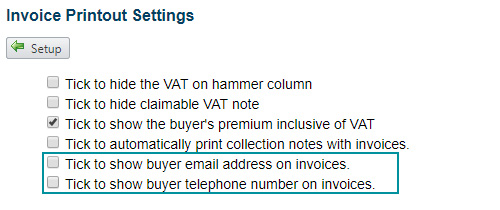
  • A new option, has been introduced to allow the display of the Buyer's phone number and/or email address on their Invoice. Tick the new options In Set-up > Company Printouts > Invoices, highlighted below, for these to be applied.
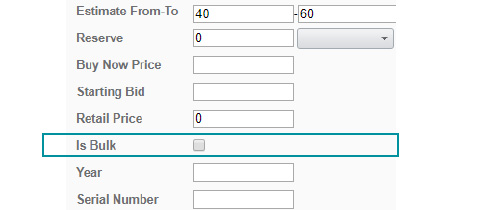
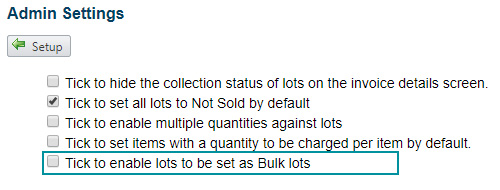
  • It is now possible to mark stock items/lots as bulk items. By ticking the ‘Is Bulk’ box, the lots will be identified as such on the portals, after the GAP Office catalogue has been synced to GAP Toolbox. This GAP Office field can also be set when importing Stock or Lot data from a spreadsheet. The availability of this option is controlled by a new set-up parameter, Set-up > Admin Settings > Settings which when ticked will ensure this option is available. This is not available on The Saleroom portal.
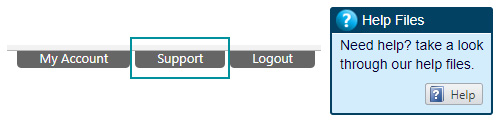
  • The GAP Office Help files have now been updated. Please note that the best way to access these files is by using the Support Button and then the Help Button.

GAP Office – Fixes

  • When allocating lots using the Visual Catalogue Builder (VCB) there will no longer be seller and lot duplication.
  • The process Lot Admin > Actions > Export Lot Pictures will now email the user a link to allow the download of images. Please note at times the user may see an error page but the link will be emailed to the user.
  • A warning message will now be displayed if a broken image, in GAP Office, is likely to causes issues when linking the GAP Office Auction to a GAP Toolbox auction.
  • During British Summer Time (BST) the End time for timed auction lots will now reflect correctly in the toolbox, during British Summer Time.
  • The Balance Sheet Report will now display the auction details correctly.
  • All Catalogue formats will now display lots, using an ampersand symbol (&) in the lot description, correctly.
  • The Statement Validation Manager will now display and allow correct navigation of the seller charges detail.
  • When using Quick lot edit only lots which have been amended will be updated, which should prevent lot detail being overwritten in error. NB. If User A is using Quick Lot Edit and updates lot 20, if prior to Users A's save User B also updates Lot 20, then user B's updates will still be overwritten.
  • In Buyer Admin, after adding a new buyer, then using the 'New Buyer' button the search of the client database button will remain active.
  • In Invoice admin, if making a Contra payment, the list of sellers will now be displayed in Alphabetical order for ease of selection.
  • The navigation, within Seller Payments, over multiple pages has been improved.

New Feature
GAP Office – Best Practice

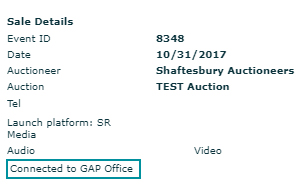
When running a Live Webcast on an ATG Portal the Live Feed, automatically updates the Auction Results data in GAP, with the hammer price and buyer id, for lots sold to an online buyer. When your operator logs onto the Live Bidding Applet, they are able to confirm that the Live Feed is available by confirming the ‘Connected to GAP Office’ message is displayed on the bottom left hand corner of the Live Bidding Applet screen, as highlighted. If the message does not display please contact us asap using the contact details below.
Contact us
If you have any questions or feedback, please don’t hesitate to call us +44 (0) 203 725 5558 or email

Kind Regards,

GAP Office Client Services Team

You are receiving this email because you are a client of GAP Office.

GAP Office
Metropress Ltd, (t/a The Auction Technology Group) Registered No: 01010311,
Registered Office: %%Member_Busname%%
%%Member_Addr%% %%Member_City%%, %%Member_State%%, %%Member_PostalCode%%, %%Member_Country%%
Tel: +44 (0) 203 725 5500

unsubscribe from this list   update subscription preferences

This email address is unmonitored, please do not reply to this email.

Copyright © 2017, The Auction Technology Group. All rights reserved.